
SA302 Form – HMRC Tax Calculation Explained
Leave your details and our team will get back to you shortly.
If you file a Self Assessment tax return, you may need an SA302 form to understand how HM Revenue & Customs calculated your tax liability or to provide evidence of income for a mortgage or another financial application.
The SA302 HMRC document is a Tax Calculation. It shows the income used in your Self Assessment calculation, relevant allowances and reliefs, and how HMRC arrived at the tax due for the particular tax year.
It is important not to confuse an SA302 with your Self Assessment account balance. Payments on account already made, other outstanding liabilities and some account transactions are dealt with separately through your HMRC Self Assessment account or statement.
Audit Consulting Group can help you obtain your SA302 from HMRC, check the calculation against your Self Assessment return, identify discrepancies and organise supporting tax documents where they are required for a mortgage or other application.
Official HMRC guidance: SA302 tax calculation
What Is the SA302 Form?
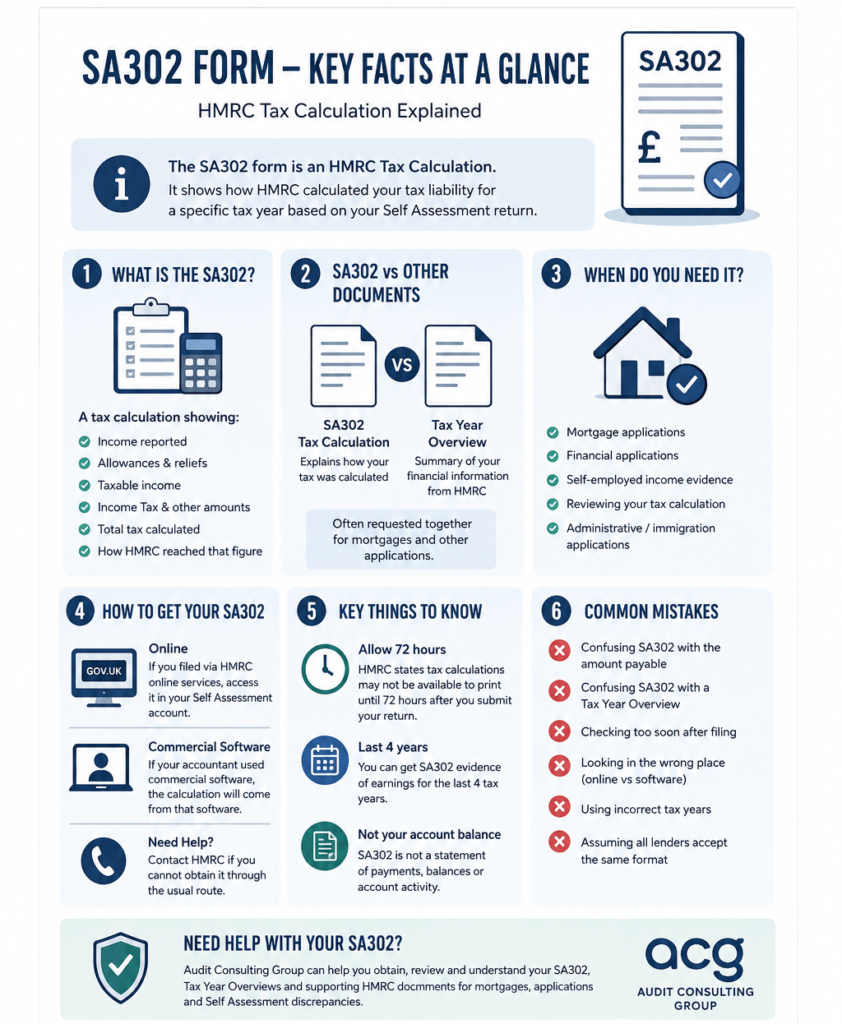
The SA302 form is an HMRC Tax Calculation produced from information reported through Self Assessment. It is also commonly referred to as the Self Assessment SA302, tax return SA302, SA302 tax form or SA302 tax calculation form.
Its purpose is to explain how the tax liability for a specific tax year has been calculated. Depending on your circumstances, the calculation may include:
- income reported through Self Assessment;
- relevant allowances and tax reliefs;
- taxable income;
- Income Tax and other amounts included in the calculation;
- the total tax calculated for the year;
- the breakdown showing how HMRC arrived at that figure.
The SA302 is not a complete statement of payments and balances on your Self Assessment account. If you need to establish what you currently owe after payments, credits or other account activity, your Self Assessment statement or online account should also be checked.
For broader assistance with returns and personal tax matters, see our Personal Tax & Self Assessment service.
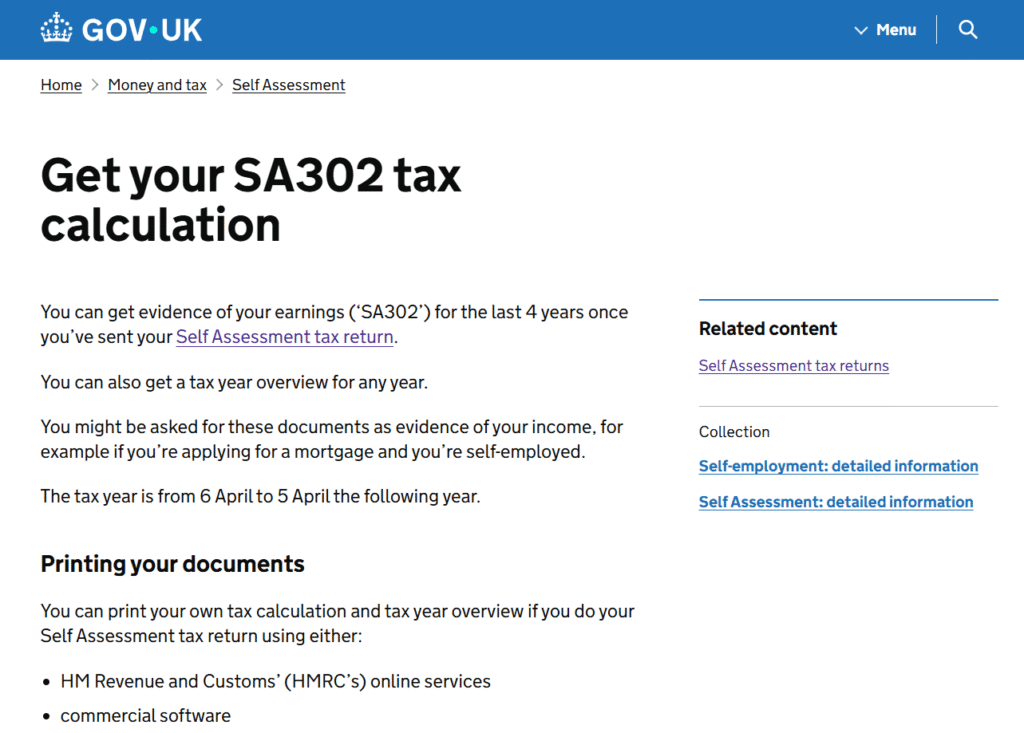
What Information Does an SA302 Tax Calculation Show?
An HMRC SA302 form relates to a particular tax year. The figures depend on the information submitted through your Self Assessment return and any relevant supplementary pages.
For example, the calculation may reflect employment income, self-employment profits, property income, dividends and other taxable income together with applicable allowances and reliefs.
If a figure on the SA302 does not look right, the underlying Self Assessment return should usually be checked first. The SA302 reflects the information used for the tax calculation rather than being a separate document that you manually edit.
SA302 vs Tax Year Overview – What Is the Difference?
The SA302 and Tax Year Overview are separate documents and are often requested together when evidence of income is required.
SA302 Tax Calculation
The SA302 explains how your Self Assessment tax liability for a particular year was calculated.
Tax Year Overview
The Tax Year Overview is generated from HMRC records for the relevant tax year. It is commonly used alongside the SA302 when a lender or another organisation wants supporting HMRC evidence.
HMRC currently allows taxpayers to obtain SA302 evidence for the previous four years, while Tax Year Overviews can be accessed for other available years. The exact documents required for an application should still be confirmed with the organisation requesting them.
SA302 vs SA300 – Which Document Do You Need?
SA302 and SA300 both relate to Self Assessment, but they serve different purposes.
- SA302 – explains how the tax liability for a tax year was calculated.
- SA300 / Self Assessment Statement of Account – relates to account activity such as charges, payments, credits and balances.
If the question is how HMRC calculated your tax, the SA302 is normally the relevant document. If the issue concerns a missing payment or an unexpected account balance, the Self Assessment statement is more relevant.
See our guide to the HMRC SA300 Statement of Account for further information.
When Do You Need the SA302 Document?
The HMRC SA302 form is most commonly needed where an organisation asks for evidence of income that has been reported through Self Assessment.
Typical situations include:
- Mortgage applications – particularly for self-employed applicants, contractors or company directors;
- Other financial applications – where HMRC evidence of earnings is requested;
- Self-employed income evidence – where an organisation wants confirmation of figures reported through Self Assessment;
- Reviewing a tax calculation – where you want to understand how HMRC arrived at the liability for the year;
- Certain administrative or immigration applications – where Self Assessment evidence is specifically listed among the required documents.
An SA302 should not be assumed to meet every lender, immigration or administrative requirement. Check the tax years, document format and supporting evidence required for the particular application.
How to Get SA302 from HMRC
How you obtain your SA302 form depends largely on how the Self Assessment return was submitted.
If You Filed Through HMRC Online Services
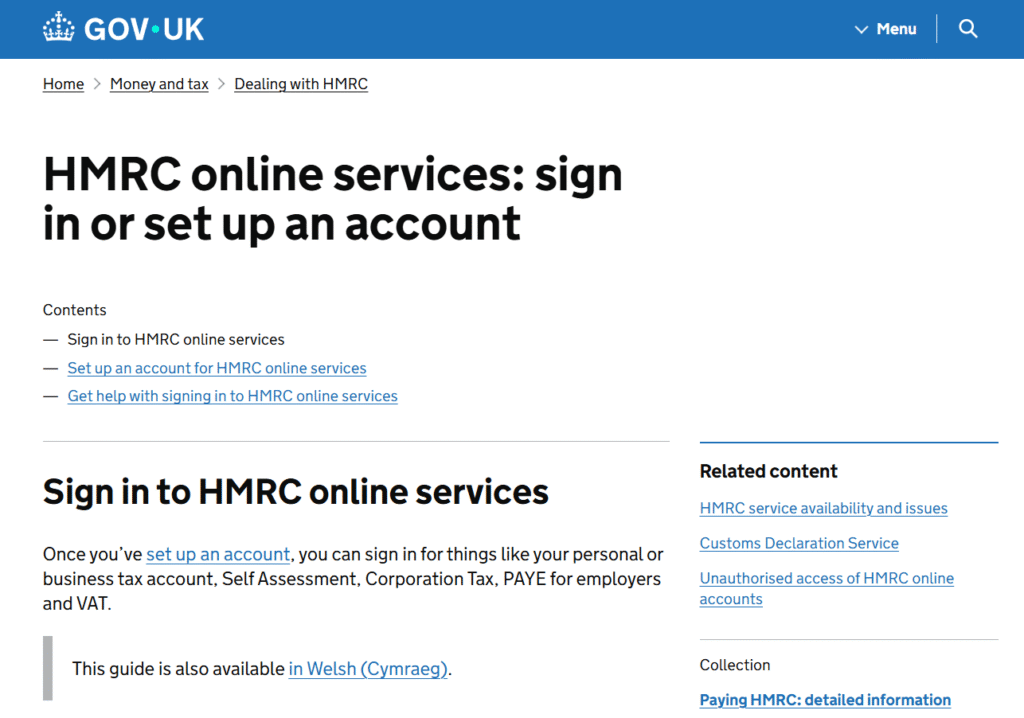
If the return was filed through HMRC’s online Self Assessment service, the relevant tax calculation can normally be accessed through your HMRC online account.
Sign in to HMRC online services
From the Self Assessment area, select the relevant return or tax year and follow the available options to view the tax calculation.
If Your Accountant Used Commercial Software
If your accountant or tax agent submitted the return through commercial tax software, the calculation will generally need to be produced from that software. Depending on the system, it may be described as an SA302, tax calculation or tax computation.
The associated Tax Year Overview can still be obtained separately through your HMRC online account.
If You Cannot Obtain the Document
If the normal online or software route does not provide the document you need, first check how the return was filed and which tax year is required. Where the issue cannot be resolved through the usual route, HMRC can be contacted for assistance.
How to Download or Print an SA302 Form PDF
If you need an SA302 form PDF or want to download or print your SA302, the route depends on how the return was submitted.
Where HMRC online services were used, the tax calculation can normally be viewed and printed from the Self Assessment area once it becomes available. Where commercial software was used, the equivalent calculation should usually be produced from that software.
Timing matters. HMRC states that tax calculation documents may not be available to print until 72 hours after the Self Assessment return is submitted. If you have just filed and cannot yet access the document, this may be the reason.
If the SA302 is needed for a mortgage or another time-sensitive application, allow for this delay rather than assuming the document will appear immediately after submission.
SA302 Form for a Mortgage
Mortgage applications are one of the main reasons people need an SA302 form for mortgage purposes. For a self-employed applicant, contractor or company director, the SA302 can help demonstrate income reported through Self Assessment.
SA302 and Tax Year Overview for a Mortgage
A mortgage lender or broker may request both an SA302 Tax Calculation and a Tax Year Overview for the same tax year. Supplying both allows the tax calculation to be considered alongside supporting information held by HMRC.
Lender requirements differ, so check which tax years are needed before preparing the documents.
How Many Years of SA302 Can You Get?
HMRC currently allows taxpayers to obtain SA302 evidence of earnings for the last four years once the relevant Self Assessment returns have been submitted.
This does not mean every mortgage provider will ask for four years. Some may request fewer years depending on the applicant’s history, circumstances and underwriting criteria.
Will a Lender Accept a Printed SA302?
Many lenders accept tax calculations produced through HMRC online services or compatible commercial software, often alongside the relevant Tax Year Overview. However, applicants should confirm their lender’s document requirements before relying on a particular format.
If you need wider support preparing financial evidence, our Mortgage or Rent Document Support service may also be relevant.
What Does an SA302 Form Look Like?
An SA302 form example or SA302 example PDF will normally identify the taxpayer and tax year and show the figures used in the tax calculation.
Depending on the return, this can include:
- identifying information;
- the tax year covered;
- income reported through Self Assessment;
- allowances and reliefs;
- taxable income;
- Income Tax and other amounts included in the calculation;
- the calculation showing how the total tax liability was reached.
The appearance may differ depending on whether the calculation comes from HMRC online services or commercial software. What matters is that it corresponds with the relevant Self Assessment return and tax year.
View HMRC guidance on SA302 tax calculations
Common SA302 Problems and Mistakes
- Confusing the SA302 with the amount currently payable – payments on account and other account transactions may need to be checked separately.
- Confusing SA302 with a Tax Year Overview – an application may require both documents.
- Trying to obtain the SA302 immediately after filing – the 72-hour availability period may apply.
- Looking only in the HMRC account when commercial software was used – the calculation may need to come from the software used to submit the return.
- Using incorrect Self Assessment figures – an incorrect return can lead to an incorrect tax calculation.
- Providing the wrong tax years – lenders and other organisations may require evidence for a specific period.
- Assuming every lender accepts the same document format – requirements should be confirmed before the application is submitted.
- Assuming an SA302 is automatically sufficient for every visa or administrative application – evidence requirements depend on the specific process.
What to Do if Your SA302 Is Wrong
If the figures on the SA302 do not match what you expect, the first step is to establish whether the underlying Self Assessment return contains incorrect or incomplete information.
Review the income reported, expenses or reliefs claimed and the resulting calculation. If the return itself is incorrect, an amendment may be required where the relevant Self Assessment rules and time limits allow it.
If the tax calculation appears correct but the amount showing as payable in your HMRC account looks wrong, the issue may instead relate to payments, payments on account, interest, penalties or another account transaction. In that situation, reviewing the SA302 alone may not resolve the difference.
Correcting a tax return and resolving an HMRC account issue are different processes, so it is important to identify which one applies before making changes.
How Audit Consulting Group Can Help with SA302
Obtaining an SA302 from HMRC is usually straightforward when the return is complete and the correct tax year is readily available. More work may be needed where several years are required, the figures do not reconcile, the document cannot be located or an application has specific evidence requirements.
Depending on the scope required, Audit Consulting Group can help you identify the relevant SA302 HMRC form or tax calculation, check which years are available, organise Tax Year Overviews, compare the SA302 with the underlying Self Assessment return and investigate discrepancies.
We can also assist where a return needs to be reviewed or corrected, help organise supporting HMRC tax documents for mortgage or financial applications, and deal with HMRC correspondence where authorised and within the agreed scope.
If your Self Assessment return has not yet been prepared or submitted, see our Personal Tax Filing service.
Practical SA302 Examples
Self-Employed Applicant Preparing for a Mortgage
A self-employed applicant is asked by a mortgage broker for tax evidence covering several years. Before sending documents, the applicant checks which tax years are required and whether the lender wants both SA302 tax calculations and Tax Year Overviews.
The documents can then be matched by year and checked against the Self Assessment records before being supplied to the broker.
Return Filed but SA302 Is Not Yet Available
A taxpayer submits a Self Assessment return and tries to access the SA302 immediately for an application. The document has not yet appeared.
Because HMRC may take up to 72 hours after submission before the calculation is available to print, the absence of the document straight after filing does not necessarily indicate a problem.
SA302 Figures Do Not Match Expectations
A taxpayer reviews the calculation and notices that an income figure differs from what was expected. Rather than trying to change the SA302 itself, the underlying Self Assessment return is checked to establish what was actually submitted.
If the return contains an error, the appropriate correction should be considered. If the return is correct, the discrepancy may need to be investigated elsewhere.
What Applicants Often Underestimate About SA302 Documents
Obtaining the SA302 is often only one part of the task. The lender or organisation requesting the evidence may also specify the tax years required, whether Tax Year Overviews must accompany the calculations and what format it will accept.
Timing is another practical issue. Filing a Self Assessment return immediately before a mortgage or financial application does not mean every supporting document will be available at once.
Finally, the accuracy of the SA302 depends on the Self Assessment information behind it. Producing another copy of the calculation will not correct income, expense or relief figures that were reported incorrectly in the return.
FAQs – SA302 Form
What is an SA302 form?
The SA302 form is an HMRC Tax Calculation showing how the Self Assessment tax liability for a particular tax year was calculated from the information reported on the return.
How do I get my SA302 form from HMRC?
If you filed through HMRC online services, the tax calculation can normally be accessed through your Self Assessment account. If commercial tax software was used, the calculation may need to be produced through that software.
Can I download my SA302 online?
Yes, where the return was filed using HMRC online services, a printable tax calculation can normally be accessed through the account once it becomes available. If commercial software was used, the equivalent document normally comes from that software.
Why can I not see my SA302 after filing?
HMRC states that the calculation may not be available to print until 72 hours after the return is submitted.
How many years of SA302 can I get?
HMRC currently allows taxpayers to obtain SA302 evidence of earnings for the last four years, provided the relevant Self Assessment returns have been submitted.
What is the difference between SA302 and Tax Year Overview?
The SA302 is the tax calculation for the year. The Tax Year Overview is separate HMRC information and is often requested alongside the SA302 when income evidence is required.
Do I need SA302 and Tax Year Overview for a mortgage?
Many lenders request both, but requirements vary. Check with your lender or broker which tax years and documents it requires.
Will a mortgage lender accept a printed SA302?
Many lenders accept calculations produced through HMRC online services or commercial tax software, often together with Tax Year Overviews. The exact format should still be confirmed with the lender.
Is SA302 the same as my Self Assessment tax return?
No. The Self Assessment return contains the information submitted to HMRC. The SA302 tax calculation shows how the tax liability was calculated from that information.
Is SA302 the same as SA300?
No. SA302 is a Tax Calculation. SA300 is associated with the Self Assessment Statement of Account and relates to account charges, payments, credits and balances.
What happens if my SA302 is wrong?
If the error comes from the underlying Self Assessment return, the return should be reviewed and may need to be amended where appropriate and permitted. The SA302 itself is the resulting calculation rather than a document that is manually edited.
Can my accountant provide my SA302?
If your accountant or tax agent submitted the return through commercial software, they may be able to provide the calculation produced by that software. Depending on the system, it may be called an SA302, tax calculation or tax computation.
Can Audit Consulting Group help with an SA302 HMRC form?
Yes. We can help identify the relevant tax calculation, review it against your Self Assessment information, organise supporting HMRC documents and assist with related document or HMRC issues within the agreed scope.
SA302 Tax Calculation Support Services Cost UK
The cost of professional SA302 support depends on what needs to be done. Obtaining and checking an existing calculation may require less work than reviewing several tax years, correcting Self Assessment information, investigating discrepancies or preparing a wider set of supporting income documents.
Audit Consulting Group can review the requirement first and confirm the appropriate scope before more extensive work is undertaken.
Service Cost Estimation
Select the service category below to calculate the estimated cost of either accounting & tax services or forms and submissions.
Select Required Services / Forms
Select one or more services/forms to receive an accurate cost estimate. You can adjust your selection at any stage.
How would you like to engage our services?
Please select whether you require a one-off service or ongoing monthly support.
Contract Duration
Your cost estimate
Apply now and get 10% OFF
Submit your request today and receive an exclusive 10% discount on your selected service.
All prices are estimates. To receive a personalised quote, please fill out the form or contact us.
Ready to get started?
Get professional support from experienced UK accountants
Need Help With Your SA302 Tax Calculation?
If you need an SA302 for a mortgage or another application, or the figures do not match your Self Assessment records, it helps to provide the tax year required, details of how the return was filed and any document request received from your lender, broker or other organisation.
We can review which SA302 and supporting HMRC documents are available, check the information and confirm what further work may be required.