
QuickBooks Payroll Services UK
Leave your details and our team will get back to you shortly.
Running payroll through QuickBooks can bring payroll and accounting information into a more connected workflow, but the software still depends on accurate employee data, correct payroll settings and a reliable process around each pay run.
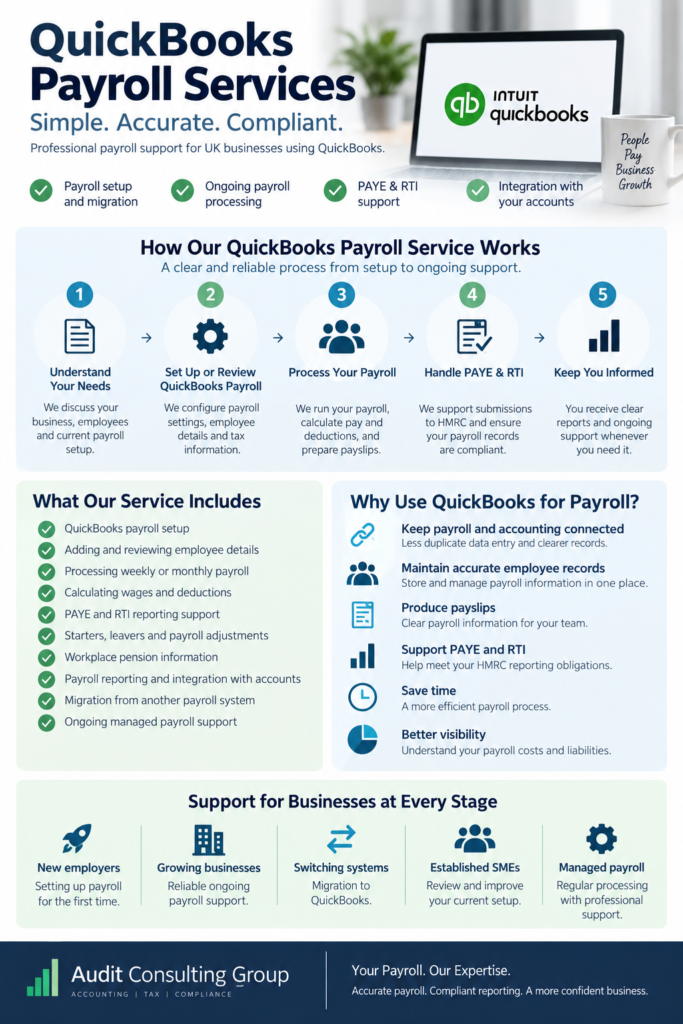
Audit Consulting Group provides QuickBooks payroll services for UK businesses that need help with payroll setup, ongoing processing, migration and payroll management. We can support employers already using QuickBooks as well as businesses planning to move payroll from another system.
Our support can cover the practical payroll cycle from employee setup and payroll calculations through to PAYE and Real Time Information (RTI) submissions, workplace pension information and payroll reporting.
What Is QuickBooks Payroll?
QuickBooks payroll is payroll software that works alongside QuickBooks accounting. Depending on the QuickBooks payroll product and configuration being used, it can help employers maintain employee payroll information, calculate pay and deductions, produce payslips and support payroll reporting and submissions.
For UK employers, payroll still needs to be operated around PAYE requirements, accurate employee information, reporting deadlines and appropriate payroll records. Software can automate parts of that process, but it does not remove the need to review payroll information before a pay run is finalised.
What Our QuickBooks Payroll Service Includes
The exact scope depends on whether you need initial setup, help with an existing QuickBooks payroll, migration from another system or ongoing managed payroll.
Support may include:
- setting up payroll in QuickBooks;
- adding and reviewing employee payroll details;
- configuring pay frequencies and payroll settings;
- processing weekly, monthly or other agreed pay runs;
- calculating wages and payroll deductions;
- preparing employee payslips;
- supporting PAYE and RTI payroll reporting;
- processing starters and leavers;
- recording relevant payroll adjustments;
- supporting workplace pension information within the payroll process;
- reviewing payroll reports;
- posting payroll information into the accounting records;
- helping migrate payroll data into QuickBooks;
- reviewing an existing QuickBooks payroll setup.
The service can therefore be used for a one-off QuickBooks payroll setup or as part of an ongoing payroll arrangement.
Why Use QuickBooks for Payroll?

For businesses already using QuickBooks for accounting, keeping payroll within the same broader system can reduce duplicated data entry and make payroll costs easier to reflect in the accounts.
Depending on the product and setup, QuickBooks payroll can help businesses:
- maintain employee payroll records;
- calculate wages and payroll deductions;
- produce payslips;
- manage regular payroll information;
- prepare payroll reports;
- support PAYE and RTI processes;
- connect payroll information with accounting records.
The practical benefit is not simply automation. A well-managed payroll process should also make it easier to understand what has been processed, identify unusual items and keep payroll information organised from one pay period to the next.
Setting Up Payroll in QuickBooks
Setting up payroll in QuickBooks involves more than creating employee profiles. The opening information affects future calculations and reporting, so the setup should reflect the employer’s actual payroll arrangements.
The process may include:
- confirming employer and PAYE information;
- adding employee details;
- checking tax codes and National Insurance information provided for payroll;
- setting pay frequencies;
- entering salary or hourly pay information;
- configuring relevant deductions or additions;
- setting up holiday and statutory payment information where applicable;
- reviewing workplace pension information;
- checking year-to-date figures where payroll is being moved during the tax year;
- reviewing payroll settings before the first live pay run.
If payroll is already running elsewhere, the setup also needs to account for payroll history. Starting a new system without the correct year-to-date information can affect later calculations and reporting.
Doing Payroll in QuickBooks
Once the payroll has been configured, each pay run follows a repeatable process.
A typical payroll cycle may involve:
- Collect payroll changes. Confirm starters, leavers, pay changes, hours, bonuses, absence information and other relevant adjustments before the payroll cut-off.
- Process the pay run. Enter or review the information required for the relevant payroll period.
- Check calculations. Review gross pay, deductions, employer costs and unusual movements before finalisation.
- Finalise payroll. Produce the payroll information and payslips for the agreed pay period.
- Complete required reporting. Deal with relevant PAYE and RTI payroll reporting based on the employer’s circumstances.
- Update the accounting records. Record payroll costs and liabilities appropriately within the accounting workflow.
This review stage matters. Automation can calculate payroll from the information provided, but it cannot determine whether a late pay change, incorrect employee detail or missing instruction should have been included unless that information reaches the payroll process.
QuickBooks Payroll, PAYE and RTI
UK employers operating PAYE generally need to report payroll information to HMRC through Real Time Information. The information submitted depends on what happened during the relevant payroll period.
A Full Payment Submission (FPS) is generally associated with payments to employees and normally needs to reflect the payroll information for that payment. An Employer Payment Summary (EPS) may be relevant in particular circumstances.
For an employer using QuickBooks payroll, the important point is that software and filing are only part of the process. Payroll information still needs to be complete and reviewed before the relevant submission is made.
Key QuickBooks Payroll Dates for UK Employers
| Payroll Task | Typical Deadline | What It Means for Your Payroll Process |
|---|---|---|
| Full Payment Submission (FPS) | On or before each employee payday | Payroll information normally needs to be finalised and the relevant FPS submitted when employees are paid. |
| PAYE & National Insurance Payment | 22nd of the following tax month when paying electronically | Employers normally need to pay the PAYE and National Insurance due to HMRC by this date when paying electronically. |
| PAYE & National Insurance Payment by Post | 19th of the following tax month | An earlier deadline normally applies where payment is made by post rather than electronically. |
| Tax Month | 6th to 5th of the following month | UK PAYE tax months run from the 6th of one month to the 5th of the next, which affects payroll reporting and liabilities. |
| P60 | By 31 May following the end of the tax year | Employees who are still employed on 5 April generally need to receive their P60 by this date. |
| P11D | By 6 July where applicable | Benefits and expenses that require P11D reporting generally need to be reported by this deadline. |
| UK Tax Year | 6 April – 5 April | Payroll year-to-date figures and annual payroll reporting follow the UK tax year rather than the calendar year. |
Important: The exact payroll obligations and deadlines that apply depend on the employer’s circumstances. QuickBooks can support payroll calculations and reporting, but employers still need an appropriate process for providing information, reviewing payroll and meeting the relevant HMRC deadlines.
QuickBooks and Payroll Integration
One reason businesses choose QuickBooks payroll is the ability to keep payroll and accounting information within a connected workflow.
This can help with:
- recording payroll expenses in the accounts;
- tracking payroll liabilities;
- reducing duplicate data entry;
- reviewing employee costs;
- supporting management reporting;
- keeping payroll information aligned with the wider bookkeeping process.
Integration, however, should not be confused with reconciliation. Payroll information still needs to be reviewed against the pay run, payments and relevant liability balances. A connected system reduces manual work, but the underlying figures still need to make sense.
Workplace Pensions and QuickBooks Payroll
For employers with workplace pension responsibilities, pension information can form part of the regular payroll process.
Depending on the employer’s arrangements, payroll work may involve:
- maintaining relevant employee pension information;
- reflecting employee and employer pension contributions in payroll;
- reviewing pension deductions as part of the pay run;
- keeping payroll information consistent with the employer’s pension arrangements;
- supporting the payroll information needed for the wider pension process.
Payroll software does not replace the employer’s separate workplace pension responsibilities, so the payroll setup should reflect the pension arrangements actually in place.
Moving Payroll to QuickBooks
 Businesses do not always start using QuickBooks payroll at the beginning of a tax year. Payroll may need to be migrated from another software package, a previous accountant or an internal payroll process.
A migration may require:
- employee details;
- current pay information;
- tax and National Insurance information used for payroll;
- year-to-date pay and deduction figures;
- starter and leaver information;
- pension information;
- previous payroll reports;
- details of the latest completed pay run.
Mid-year payroll migration requires particular care because the new system needs the relevant payroll history to continue calculations and reporting correctly. Migration is therefore more than copying employee names into QuickBooks.
QuickBooks Payroll Software vs Managed Payroll Service
Using payroll software yourself and outsourcing payroll management are different approaches.
Running QuickBooks payroll internally may suit a business with a straightforward payroll, someone responsible for maintaining payroll knowledge and enough internal time to collect, check and process payroll changes.
Managed QuickBooks payroll may be more appropriate where the employer wants regular processing support, additional review or less involvement in the day-to-day payroll administration.
| QuickBooks Payroll Software | Managed QuickBooks Payroll Service |
|---|---|
| The business operates payroll internally | Payroll is processed with professional support |
| Internal staff maintain payroll information | Payroll information is provided for an agreed processing cycle |
| The business reviews calculations and submissions | The payroll process includes an agreed review and reporting workflow |
| Suitable where payroll knowledge and capacity are available internally | Useful where the business wants ongoing payroll administration support |
The right approach depends on payroll complexity, employee numbers, internal resources and how much control the business wants to retain over payroll processing.
QuickBooks Payroll Pricing and Service Costs
QuickBooks payroll pricing can refer to two different costs: the cost of the relevant QuickBooks software or payroll product and the professional fee for setting up or managing payroll.
The cost of a managed QuickBooks payroll service can depend on:
- number of employees;
- pay frequency;
- number of starters and leavers;
- variable pay, overtime or bonuses;
- statutory payments;
- workplace pension requirements;
- whether payroll is already correctly configured;
- whether historical payroll information needs to be migrated;
- the amount of ongoing payroll administration required.
For this reason, two businesses with the same number of employees may require different levels of payroll work. Employee count matters, but so does the number of changes and exceptions that need to be processed during each payroll cycle.
What We Need From You to Run QuickBooks Payroll
A reliable payroll process depends on information reaching the payroll team before the agreed cut-off.
Depending on the engagement, we may need:
- employer and PAYE details;
- employee payroll information;
- starter and leaver information;
- salary, hours or other pay information;
- bonuses, commissions or overtime;
- absence and statutory payment information where relevant;
- pension information;
- changes to employee circumstances that affect payroll;
- previous payroll records where a migration or correction is required.
Agreeing who provides payroll changes, how they are provided and when they must be received can prevent avoidable problems later in the process.
What Businesses Often Underestimate About QuickBooks Payroll
QuickBooks can automate calculations and reporting steps, but automation does not remove the need for payroll control.
Businesses often underestimate:
- the importance of accurate opening payroll information;
- the effect of late employee changes;
- the need to review unusual payroll movements;
- the complexity of mid-year migration;
- the importance of payroll cut-off dates;
- the difference between processing payroll and reconciling payroll information with the accounts;
- the administrative effect of frequent starters, leavers and variable pay.
A relatively small payroll can still require careful management if employee information changes frequently.
Practical QuickBooks Payroll Scenarios
Small Retailer Moving From Manual Payroll
Illustrative scenario: A small retailer has been maintaining payroll information manually and wants to move the process into QuickBooks. The initial work would focus on checking employee details, configuring payroll settings, entering the relevant opening information and reviewing the first payroll cycle before the new process becomes routine.
Growing Business That Wants Payroll Managed
Illustrative scenario: A business already uses QuickBooks for accounting but does not want its internal team to manage every payroll task. A managed arrangement could establish a payroll cut-off, define what information the business provides and create a regular processing and review cycle.
Business Switching Payroll Systems Mid-Year
Illustrative scenario: An employer moves payroll to QuickBooks after several pay periods have already been completed elsewhere. The migration would require relevant year-to-date figures and payroll history so that the new system can continue from the correct position rather than treating existing employees as entirely new payroll records.
Who QuickBooks Payroll Support Is Suitable For
QuickBooks payroll support can be relevant to:
- small businesses employing their first members of staff;
- established SMEs already using QuickBooks accounting;
- businesses moving from manual payroll;
- employers switching payroll software;
- businesses that want payroll managed on an ongoing basis;
- businesses that need help reviewing an existing QuickBooks payroll setup.
It may also be useful where payroll has become more difficult to manage because employee numbers, pay arrangements or payroll changes have increased.
Why Audit Consulting Group?
Our approach to QuickBooks payroll is based on the payroll process around the software, not simply on entering information into a system.
We can support businesses with:
- QuickBooks payroll setup;
- ongoing payroll processing;
- PAYE and RTI payroll administration;
- payroll migration;
- review of payroll information;
- integration of payroll information with accounting records;
- clear communication around payroll cut-offs and required information.
Where we manage payroll, the scope and responsibilities can be agreed at the outset so that both sides understand what information is required and when it needs to be provided.
Frequently Asked Questions About QuickBooks Payroll
Can QuickBooks be used for payroll in the UK?
QuickBooks offers payroll functionality for businesses using supported UK payroll products. The appropriate setup depends on the product being used and the employer’s payroll requirements.
Can you set up payroll in QuickBooks for us?
Yes. We can help configure QuickBooks payroll, review the information needed for the setup and support the transition to live payroll processing.
Can you manage QuickBooks payroll every month?
Yes. QuickBooks payroll can be supported as an ongoing managed service, subject to an agreed scope, payroll timetable and information process.
Can payroll be moved to QuickBooks during the tax year?
Yes, but a mid-year migration normally requires relevant payroll history and year-to-date figures so that payroll can continue from the correct position.
Does QuickBooks submit payroll information to HMRC?
Supported UK payroll functionality can be used as part of the RTI reporting process. The exact workflow depends on the QuickBooks payroll product and configuration being used.
Can QuickBooks calculate PAYE and National Insurance?
Supported UK payroll functionality can calculate payroll deductions based on the payroll information and settings entered into the system. The underlying employee and payroll information still needs to be accurate.
Can QuickBooks handle workplace pension deductions?
Payroll can include relevant pension deductions and contribution information, depending on the payroll setup and pension arrangements. Employers should still ensure that their separate workplace pension responsibilities are being handled appropriately.
Can QuickBooks payroll integrate with accounting?
Yes, one of the main practical advantages of using QuickBooks payroll alongside QuickBooks accounting is the ability to keep payroll costs and related accounting information within a connected workflow.
How much does QuickBooks payroll cost?
The overall cost can include both the relevant QuickBooks product charges and any professional payroll service fees. Managed payroll fees depend on factors such as employee numbers, payroll frequency, complexity and the amount of administration required.
Can QuickBooks payroll be used for one employee?
A small payroll can still be operated through suitable payroll software. Whether QuickBooks is the appropriate option depends on the employer’s wider accounting setup and payroll requirements.
What payroll frequency can QuickBooks support?
The appropriate payroll setup depends on the pay arrangements used by the business. Weekly and monthly payrolls are common, but the actual configuration should reflect how employees are paid.
Do I still need to check payroll if QuickBooks calculates it automatically?
Yes. Payroll software calculates from the information available to it. Employee changes, unusual payments, deductions and other payroll inputs should therefore be reviewed before payroll is finalised.
Get Help With QuickBooks Payroll

If you need help setting up payroll in QuickBooks, moving payroll from another system or managing regular pay runs, Audit Consulting Group can review your current payroll arrangements and the level of support required.
Contact us with your approximate employee numbers, payroll frequency and current payroll setup so we can understand the work involved and discuss the next steps.
QuickBooks Payroll Services Cost & Pricing in the UK
Calculate the cost of QuickBooks payroll services in the UK based on the payroll support your business requires. The scope can include payroll setup, regular payroll processing, PAYE and RTI administration, migration and ongoing QuickBooks payroll management.
Service Cost Estimation
Select the service category below to calculate the estimated cost of either accounting & tax services or forms and submissions.
Select Required Services / Forms
Select one or more services/forms to receive an accurate cost estimate. You can adjust your selection at any stage.
How would you like to engage our services?
Please select whether you require a one-off service or ongoing monthly support.
Contract Duration
Your cost estimate
Apply now and get 10% OFF
Submit your request today and receive an exclusive 10% discount on your selected service.
All prices are estimates. To receive a personalised quote, please fill out the form or contact us.
Ready to get started?
Get professional support from experienced UK accountants